Download Instagram Photos in Full HD Online Free
Download Instagram photos, pictures & multi-photo carousel posts in original Full HD 1080p resolution for free.
Download Instagram Photos Online in Original High Resolution
InstaSaver Instagram Photo Downloader is an advanced, high-speed online tool that allows you to easily download photos and pictures from Instagram in their original resolution and maximum clarity. Instagram does not provide a native save button to export high-definition pictures to your device gallery, but with InstaSaver, you can save any public photo in just one click.
Whether it is a single post photo or a multi-image carousel post (album) containing up to 10 pictures, our downloader automatically parses the highest available resolution (Full HD 1080p, 2K, and 4K when available) directly from Instagram's content delivery servers, ensuring zero compression and zero quality degradation.
InstaSaver: Online Instagram Downloader
Why Choose InstaSaver for Instagram Photo Download?
Experience the easiest, cleanest, and fastest photo downloading platform designed with user privacy in mind.
Original Full HD Quality
Never settle for low-res screenshots. Download photos in their original dimensions and pixel-perfect clarity.
Carousel Album Support
Paste multi-photo post links and extract all pictures individually so you can pick and choose what to download.
Instant 1-Click Speed
Powered by our high-speed processing engine that fetches and delivers direct JPG download links in under 2 seconds.
100% Anonymous & Secure
No Instagram login, account credentials, or personal data required. Your downloads are private and never logged.
Universal Device Support
Works seamlessly on iPhone (Safari), iPad, Android smartphones (Chrome, Samsung Internet), Mac, and Windows PC.
Completely Free Forever
Unlimited downloads without subscriptions, premium paywalls, or annoying mandatory registrations.
How to Download Instagram Photos Online with InstaSaver
Open the Instagram app or website, locate the photo or carousel post, tap the three dots icon () or Share button and select "Copy Link".
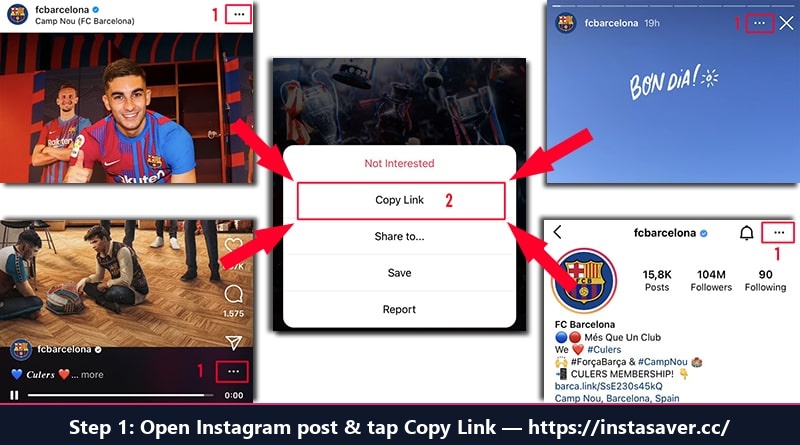
Step 1: Open Instagram, tap Share and select "Copy Link"
Open InstaSaver.cc in your browser, paste the copied link into the search box above, and press "Download".
Our tool will instantly process the link and display all photos in the post. Click "Download Photo" to save the original high-resolution picture to your device gallery.
Download Instagram Photos on Any Device
How to save Instagram photos to iPhone / iPad
On iOS devices, open the Instagram app and tap Share ➜ Copy Link. Open Safari, visit InstaSaver.cc, paste the link and tap Download. When the photo appears, tap "Download Photo", then tap the Share icon in Safari and select "Save Image" to store it directly in your Camera Roll Photos app.
How to save Instagram photos on Android
On Android, copy the Instagram photo link, open your favorite browser (Chrome, Samsung Internet, Firefox), paste the link on InstaSaver and tap Download. Tap "Download Photo" and the image will be immediately saved to your phone's Downloads folder and displayed in your phone gallery.
How to download Instagram photos on PC / Mac
On your computer, open instagram.com, click on the photo post and copy the URL from the browser address bar. Paste it into InstaSaver and click Download. Click "Download Photo" and the picture will be saved directly to your computer's Downloads folder in original high resolution.
Frequently Asked Questions (FAQ)
Everything you need to know about downloading Instagram photos with InstaSaver
Does InstaSaver reduce the resolution of downloaded photos?
No, absolutely not. Unlike taking a screenshot (which loses resolution and crops the image), InstaSaver accesses the original source file uploaded to Instagram and downloads the maximum available quality (typically 1080x1080 or 1080x1350 pixels).
Can I download multi-photo carousel posts with InstaSaver?
Yes! If an Instagram post contains multiple images (a carousel post or gallery), our tool automatically detects all individual images and presents them with individual Download buttons so you can save all of them or just the ones you like.
Do I need to install any software or browser extension?
No installation is required. InstaSaver is 100% web-based and functions smoothly on all modern web browsers including Google Chrome, Safari, Firefox, Edge, and Opera.
Can I download photos from private Instagram accounts?
No. To respect user privacy and adhere to security guidelines, InstaSaver only supports downloading media from public Instagram accounts and posts.
Is it legal to download Instagram photos?
Downloading Instagram photos for personal use (such as wallpapers, offline viewing, or personal reference) is generally permitted. However, re-uploading, republishing, or commercially using other creators' photographs without their explicit permission is a violation of copyright law.
Is this Instagram Photo Downloader free to use?
Yes, InstaSaver Instagram Photo Downloader is 100% free with unlimited downloads. There are no daily limits, subscriptions, or credit card requirements.